Client Portal for Marketing Agencies: What to Show and What to Hide
Marketing agencies lose a surprising amount of time to a single question: where are we on this? It arrives by email on Monday, by Slack on Wednesday, and on the call you scheduled to answer it. A client portal for marketing agencies turns that recurring question into a page the client can open whenever they want.
This guide covers what belongs on that page, what should stay internal, and how agencies build one on the workspace they already run projects in.
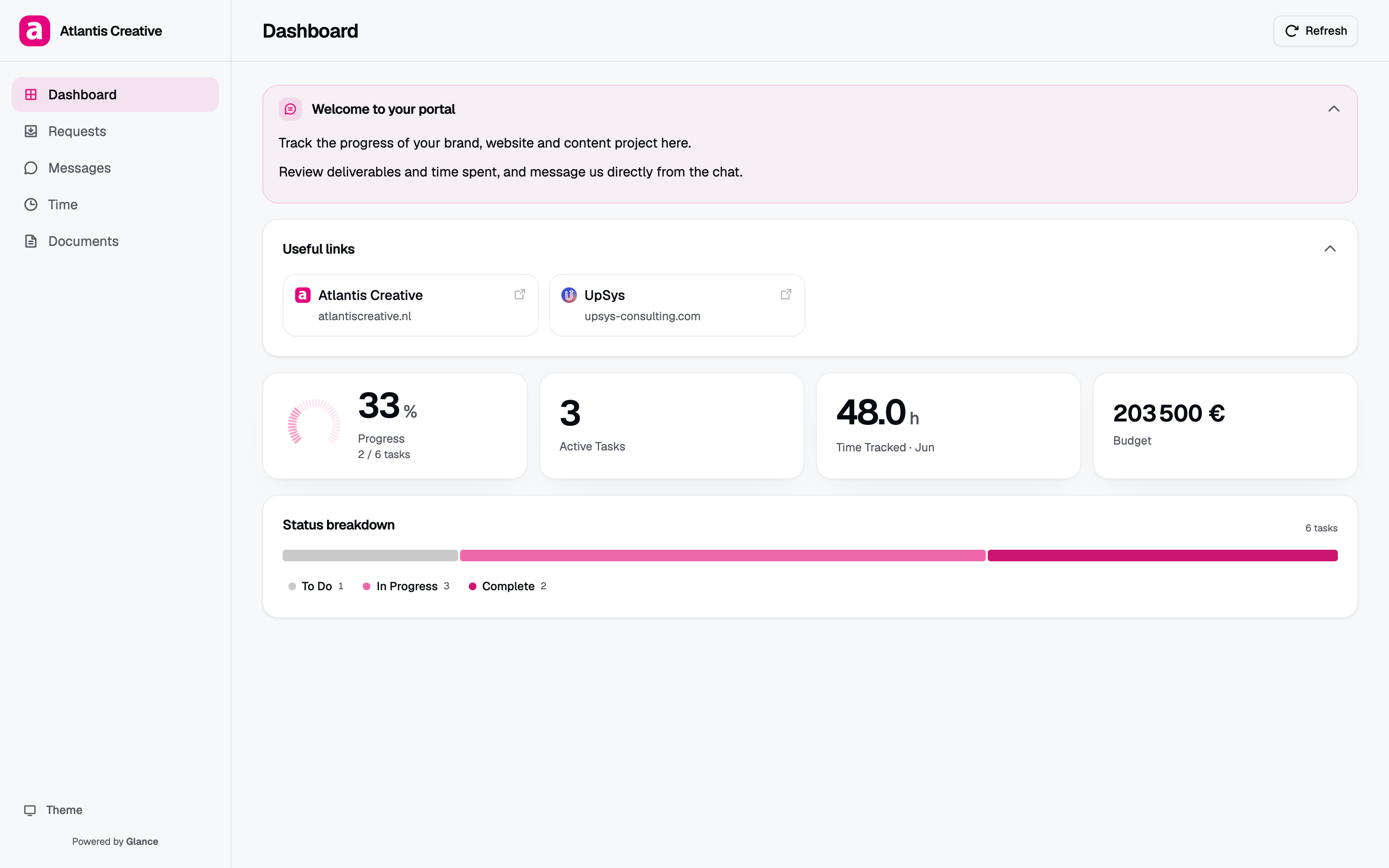
A client portal for a creative agency: progress, active work, time, and status, all read live from ClickUp.
The problem is not reporting, it is repetition
Agencies already report. The issue is that reporting happens in a format that expires. A status email describes Tuesday, and by Thursday the client is asking again because the email no longer reflects reality.
Those asks cost an account manager a context switch, and the answer is reconstructed by hand each time from the same underlying data. Multiply by your client count and it becomes a meaningful share of the week.
A portal changes the shape of the exchange. The client gets a page that is current by construction, because it reads from the workspace where the work actually happens. The question stops being asked, and nobody writes the answer.
The 5 cards to show
Keep the page short. A portal earns trust by answering the client’s real questions quickly, and every extra card makes the important ones harder to find.
- Progress. One roll-up that says how far along the engagement is. This is the first thing most clients look for.
- Deliverables. The concrete outputs they are paying for, each with a current state. For a marketing agency that usually means campaigns, creative assets, landing pages, content pieces.
- Status overview. What is in flight, what is blocked, what is done, mapped from your own statuses.
- Time against budget. For retainers this is the difference between a client who trusts the invoice and one who queries it. For fixed-scope work, switch it off.
- A place to ask. A request or message panel keeps questions attached to the project rather than scattered across inboxes.
That is usually the whole page. If a card does not answer a question a client actually asks, it is decoration.
Keep off the page
The hiding matters as much as the showing, and it is where agencies get burned.
- Internal comments. Your team writes plainly about scope creep, client indecision, and what things really cost. None of that was written for the client.
- Estimates and margin. A time estimate reads as a quote to a client who was not part of the estimating conversation.
- Unstarted exploration. Work in a backlog is not a promise. Showing it creates expectations you did not make.
- Other clients. Per-client scoping has to be structural, because a filter is something someone remembers to apply.
- Task-level churn. A client watching tasks move around all day learns that the project is chaotic, which is a misreading of normal work.
The reliable way to handle this is selection rather than filtering. A filter hides rows from a dataset the viewer can otherwise reach. Selection builds the page from an explicit list of what is allowed, so anything unselected never reaches the browser.
Branding is doing real work here
Marketing agencies sell taste. A client portal is one of the few artifacts a client interacts with every week, which makes it one of the strongest impressions you make between kickoff and delivery.
A page carrying your logo, your brand color, and your typeface reads as part of the service. A ClickUp view carrying ClickUp’s chrome reads as a tool you happen to use. For an agency whose pitch includes brand work, that second option is a quiet contradiction.
Building one on ClickUp
Most agencies already run delivery in a project tool, so the portal should read from it rather than duplicate it. With Client Glance, connected to ClickUp:
- Connect ClickUp over OAuth. The connection is read-only, so a portal can display work but never modify it. Your token is encrypted at rest with AES-256-GCM.
- Point a portal at one client’s list or folder. That scoping is what keeps clients separated from each other.
- Choose the cards. Progress, deliverables, status, time, messages. Switch off what should stay internal.
- Apply your branding. Logo, brand color, font.
- Set a password and share the link. No client account, no guest seat.
Because it reads live, the page stays current on its own. A task moving in ClickUp updates the client’s view with no extra step. For a broader look at the options, see our guide to client portal software for agencies, and the walkthrough in how to create a ClickUp client portal.
Rolling it out without friction
The rollout tends to fail in the same 2 ways, and both are avoidable.
Launching silently. A link the client never opens changes nothing. Introduce it on a call, walk through the page once, and point at it the next 3 times they ask for a status. After that the habit forms on its own.
Launching with a thin page. A portal showing an empty deliverables card and a progress bar at zero teaches the client that the page is not worth checking. Set up the portal when there is real work to show.
Start with 2 or 3 clients rather than the whole roster. You will learn which cards your clients care about, and the rest of the rollout is then a copy of a setup you already know works.
You can read how per-portal scoping and branding work in the help center, and follow what ships on the changelog.
Frequently asked questions
What should a marketing agency client portal include? Current status, the deliverables the client is paying for, a progress roll-up, and a way to ask a question. Retainer clients usually also want hours against budget. If a card does not answer a question the client repeatedly asks, leave it off.
Should clients see individual tasks? Usually not all of them. Clients track deliverables and dates rather than the task breakdown your team works from. Show the deliverable level by default.
Do I need a separate portal per client? Yes. A single page per client is what makes scoping and access control meaningful, and it lets you revoke one client without touching the others.
How is a portal different from a shared reporting dashboard? Reporting dashboards pull campaign metrics from ad and analytics platforms. A portal shows project delivery: what is in progress, what shipped, what is next. Many agencies run both.