Copilot Client Portal Alternative for ClickUp Agencies, From $20 a Month
The client portal once called Copilot is now Assembly. The name changed on 30 September 2025, so a search for a Copilot client portal alternative lands you on Assembly’s site.
This post is for agencies that run client work in ClickUp. For you, the test is short: can the portal show the tasks you already track in ClickUp, without you typing them in twice?
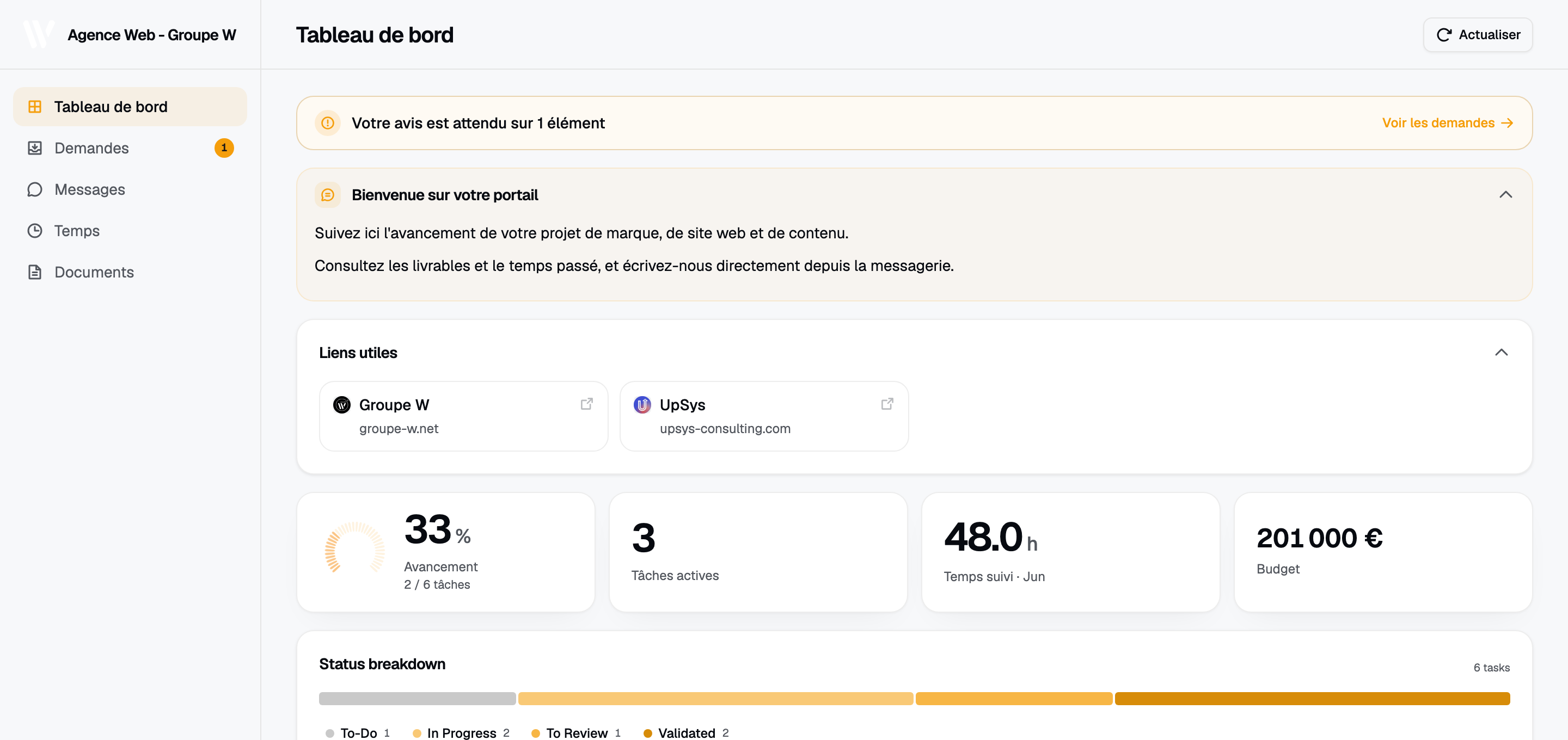
A Client Glance portal. The numbers on it come from the agency’s ClickUp list.
Assembly’s strong side
Assembly is a full client workspace. Its pricing page lists a CRM, messaging with a team inbox, billing and payments, an app builder and over 30 ready-made apps. Clients sign in to one branded place where they can message you, pay you and trade files.
If you want invoices, messages and files behind one client login, Assembly does that and Glance doesn’t. It’s also the better pick when your project work isn’t in ClickUp, or when clients don’t need to see it. And if you want to build small custom apps for clients, Assembly sells that too, metered in build credits: 50 a month on Free, 200 on paid plans.
The ClickUp app shows a public link
Setup takes 2 steps. Turn on ClickUp’s public link for a Space or Doc, then paste that link into Assembly’s ClickUp app. Clients can look at the embed but can’t edit it. 2 things follow:
- The client sees ClickUp’s screen, with ClickUp’s sidebar and terms, framed inside your portal.
- Your client signs in to Assembly to see the embed, but the ClickUp link underneath has no password. If someone forwards it, it opens for them too.
Or your team types each update into Assembly after logging it in ClickUp. That’s the double entry a portal is supposed to remove.
Custom domains and removing the Assembly badge start on the Professional plan, which comes with 500 active contacts and 3 internal users.
Client Glance: one ClickUp list per client page
You point Client Glance at a ClickUp list or folder, and it builds a password-protected page for that one client.
- You connect ClickUp once over OAuth. Client Glance writes back only what clients send from the portal (requests, comments and files), and the token is encrypted with AES-256-GCM.
- The client sees the cards you switch on: progress, deliverables, time, budget and retainer burn-down, filled from your ClickUp tasks, time entries and custom fields.
- Move a task to done in ClickUp and the progress bar on the client’s page moves with it. You don’t re-type anything.
- Clients open a link and type the password you set. No account, no ClickUp seat.
- You can add your logo, colors and font on every plan, Starter included. On Agency, you can hide the Glance badge and serve portals from your own domain.
Glance has no invoices, contracts, e-signature or CRM. If you need those in the same login as project status, Assembly covers more.
Side by side
| On 7 Oct 2026 | Assembly | Client Glance |
|---|---|---|
| Built around | A client workspace: CRM, messages, billing, apps | Your ClickUp lists, shown to clients |
| ClickUp data | Embeds a ClickUp public link, view-only | Reads ClickUp over OAuth, draws its own cards |
| How clients get in | They sign in to an account | A link and a password per portal |
| Free option | Free plan for 5 active contacts | 14 days of Pro, no card |
| Entry price | Starter, $29/month billed yearly ($49 monthly) | Starter, $20/month for 5 portals |
| Custom domain | Professional plan and up | Agency plan, $139/month for 100 portals |
| Remove vendor badge | Professional plan and up | Agency plan |
| Invoices and contracts | Yes | No |
Prices come from each company’s pricing page on 7 October 2026. Professional and Advanced prices are missing because Assembly’s page didn’t show them to us.
Switching one client at a time
- Start the 14-day trial. It runs on Pro and doesn’t ask for a card.
- Connect ClickUp and point one portal at one client’s list or folder.
- Pick the cards that client should see. Switch off time or budget if they shouldn’t.
- Add your logo, color and a password, then send the link next to your Assembly portal.
- After a week, ask the client which one they opened. If Assembly was only their status page, you can remove the ClickUp embed there, or cancel Assembly.
If invoices and contracts are why you’re on Assembly, keep it for that and send the Glance link next to it.
We’ll also set up your first portal with you on a free call, and the first month is free. Looking at SuiteDash too? It starts at $19 a month for unlimited clients and staff, our SuiteDash alternative post sets it against Client Glance, and the best client portal software guide adds more tools.
Frequently asked questions
Is Copilot the same company as Assembly? Yes. Copilot renamed itself Assembly on 30 September 2025. Old copilot.app portals and custom domains kept working, and clients didn’t have to log in again.
Does Assembly connect to ClickUp? Yes, through a ClickUp app that embeds ClickUp’s public link for a Space or Doc. Clients can view it but not edit it.
Is Assembly cheaper than Client Glance? Assembly lists Starter at $29 a month billed yearly or $49 monthly, and custom domains start on Professional. Client Glance starts at $20 a month for 5 portals, and custom domains come with Agency at $139.
Do my clients need an account in Client Glance? No. They get a link and a password. They don’t sign up, and they don’t need a ClickUp seat.
Can I keep Assembly for billing and use Client Glance for project status? Yes. Send invoices and contracts from Assembly, and send the Glance link for project status.