SuiteDash Alternative for Agencies That Run on ClickUp
SuiteDash sells one login for most of a small business: CRM, proposals, contracts, invoicing, projects, file sharing, a client portal, email marketing and a course builder. Its pricing page starts at $19 a month, and every plan comes with unlimited clients and staff.
If your agency already runs projects in ClickUp, you’d be paying for 2 project tools. This post looks at where SuiteDash fits, where that overlap costs you time, and what Client Glance does differently.
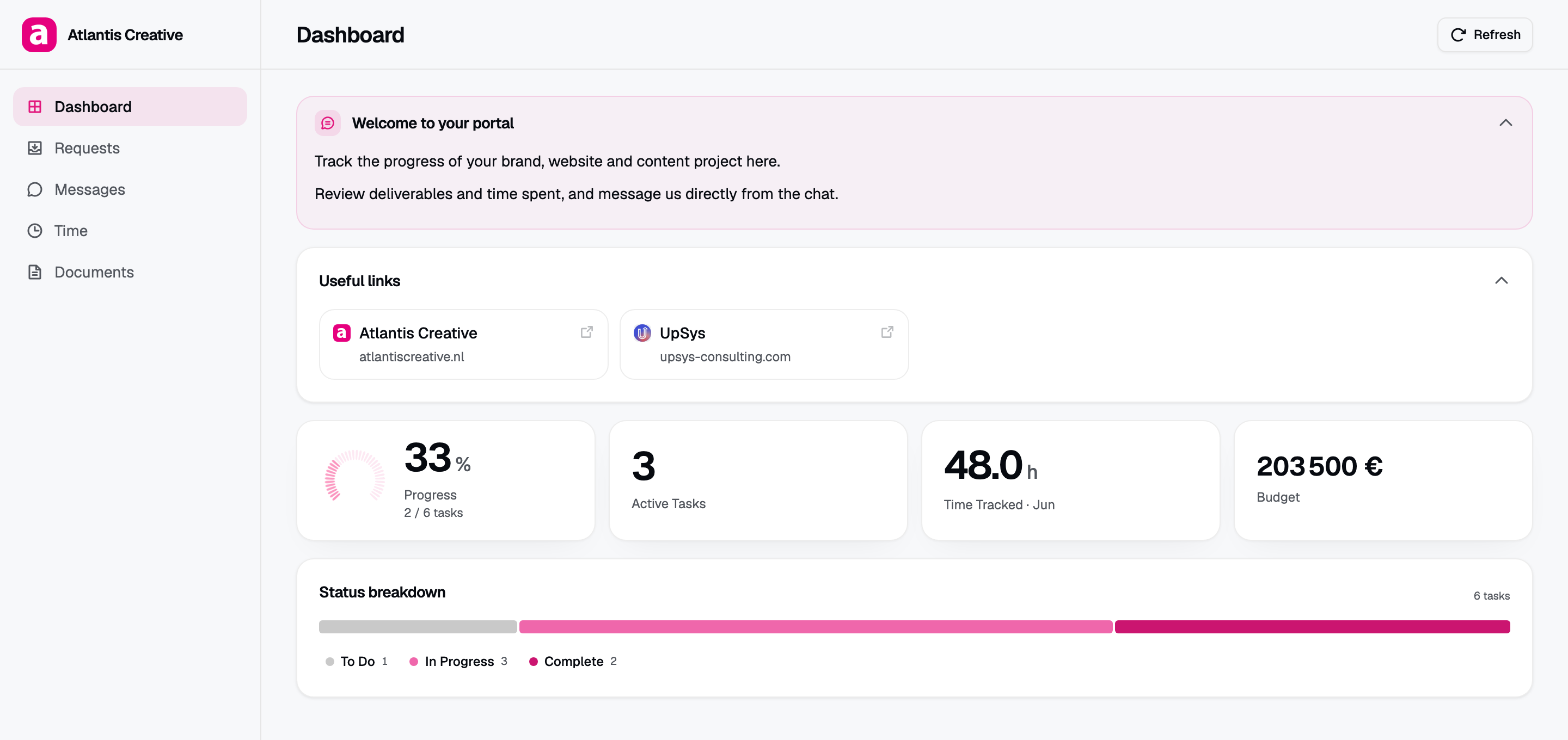
A Client Glance portal. The tasks and hours come straight from the agency’s ClickUp list.
SuiteDash’s strong side
Price per head is hard to beat. SuiteDash charges per plan, not per user, so a team of 12 pays the same as a team of 2. The 3 plans on its pricing page:
- Start, $19 a month or $180 a year: CRM, client portals, email marketing, 100GB of storage.
- Thrive, $49 a month or $480 a year: adds drip email, proposals, deal pipelines, live chat with clients, 500GB.
- Pinnacle, $99 a month or $960 a year: adds automations, onboarding flows, a course builder, support tickets, task dependencies, 2TB.
White labeling and a custom branded mobile app are listed on all 3. The 14-day trial runs on Pinnacle and doesn’t ask for a card.
So SuiteDash makes sense if you want to replace several tools at once, or if you’re starting fresh and haven’t picked a project tool yet.
Running SuiteDash next to ClickUp
The trouble starts when ClickUp is already where your team plans and tracks the work.
SuiteDash has its own project and task management. To show ClickUp work in a SuiteDash portal, the work has to exist in SuiteDash too. The ready-made Zapier templates create a SuiteDash project or task when a ClickUp task is created, and the reverse. After that first copy, keeping statuses, dates and hours in step is up to you.
In practice that leaves 3 options:
- Move project work from ClickUp into SuiteDash. That’s a migration your whole team feels.
- Build and look after zaps that copy tasks across. A broken zap means a client sees an old status.
- Type client updates into SuiteDash by hand. That’s the Friday status email again, in a new place.
All 3 add work that goes away when the portal reads ClickUp itself.
Client Glance reads ClickUp itself
Client Glance has a single job: a password-protected page per client, built from a ClickUp list or folder.
- You connect ClickUp once over OAuth. Client Glance writes back only what clients send from the portal (requests, comments and files), and the token is encrypted with AES-256-GCM.
- You switch on the cards a client should see: progress, deliverables, time, budget and retainer burn-down.
- Move a task to done in ClickUp and the client’s progress bar moves too. There’s no copy to keep in step.
- Clients open a link and type a password. They don’t make an account.
- Portals open in English, French or Spanish.
- You can add your logo, colors and font on any plan. On Agency, you can hide the Glance badge and serve portals from your own domain.
SuiteDash adds a lot around the portal that Glance leaves out. Client Glance has no CRM, invoices, proposals, e-signature, email marketing or course builder.
Side by side
| On 7 Oct 2026 | SuiteDash | Client Glance |
|---|---|---|
| Built around | CRM, billing, projects and portal in one tool | Your ClickUp lists, shown to clients |
| ClickUp data | Copied in through Zapier or Make | Read live over OAuth |
| Price | $19, $49 or $99 a month | $20, $55 or $139 a month |
| What the price counts | Plan only: clients and staff unlimited | Portals: 5, 20 or 100 |
| White label | Listed on all plans | Agency plan |
| Custom domain | Branded domain and login screen, in the trial | Agency plan |
| Free trial | 14 days on Pinnacle without a card | 14 days on Pro without a card |
| Invoices and proposals | Yes | No |
| Branded mobile app | Yes | No, clients use a web link |
Prices come from each company’s pricing page on 7 October 2026. Yearly billing lowers both: SuiteDash to $180, $480 and $960 a year, Client Glance to $16, $44 and $111 a month.
Moving one client from SuiteDash to Client Glance
- Start the 14-day trial. It runs on Pro and doesn’t need a card.
- Connect ClickUp and point a portal at one client’s list or folder.
- Pick that client’s cards. Hide time or budget if they shouldn’t see it.
- Add your logo, color and a password, and send the link.
- Turn off any zap for that client once they’ve used the new link for a week.
If you send invoices and proposals from SuiteDash, keep doing that. You only move the status page.
We’ll also set up your first portal with you on a free call, and the first month is free. Comparing Copilot too? It’s now called Assembly, and our Copilot client portal alternative post covers it. The best client portal software guide lists more tools.
Frequently asked questions
How much does SuiteDash cost? Start is $19 a month, Thrive $49 and Pinnacle $99, or $180, $480 and $960 a year. All plans include unlimited clients and staff.
Does SuiteDash connect to ClickUp? Through Zapier or Make, which copy tasks between the 2 tools. Client Glance reads ClickUp directly, so there’s one copy of each task.
Is SuiteDash white label? Yes, on all 3 plans, with a custom branded mobile app. Client Glance hides its badge and adds a custom domain on Agency.
Can Client Glance replace SuiteDash completely? Only if you use SuiteDash as a client portal. Client Glance has no CRM, invoicing, proposals or e-signature.
Do clients need a login for Client Glance? No account. They get a link and a password you set.